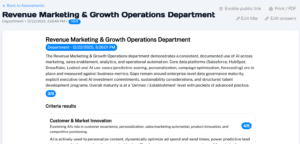
When your Assessment is ready, you can view the results, share, print, save as a PDF, change the title, or edit your answers and re-run the Assessment.
To share your completed Assessment with users who don’t have a One-Click AI account, click Enable public link on the top-right of the window. This will automatically copy a shareable link to the Assessment that you can paste into emails or other external conversations.
To revoke access to an Assessment, click Disable public link.
To print or download the Assessment, click Print/PDF on the top-right of the window.
You can edit the title of the Assessment with the Edit title option.
And if you would like to edit answers in the Assessment and re-run it, click Edit answers and you will be taken back to the Assessment console where you can change answers to any question. Once you are ready, click Save & Re-run and OC will run your edited Assessment.