One-Click AI’s Integrations are connections between OC and various external applications. These connections extend the power of your One-Click AI account by sending information to and from these apps.
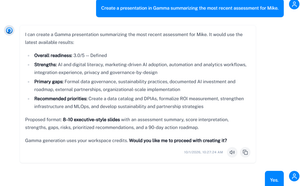
For example, OC can retrieve information from conversations in your Slack workspace to provide better context for your OC Chat Console conversations. It can also send One-Click AI information, such as the results of a completed assessment, to your Gamma account so you can automatically create visual presentations of those insights.
Our Webhooks integration works with your accounts on Zapier, Make, n8n, and similar platforms, meaning you can potentially use your OC data in thousands of other applications as part of more complex workflows.
If you want to use your OC assessments and conversations as context within other AI applications you regularly use, you should try out the One-Click AI MCP Server. With this Integration, you can use your OC data on any system that utilizes Model Context Protocol.
Each Integration in One-Click AI provides step-by-step instructions: in most cases, you will either log in directly with an application, provide an API key, or simply paste in a webhook to get started.
After you connect an Integration, you can use it by visiting Chat with OC and beginning a conversation. You use natural language, and OC will take it from there. Examples of requests can include “Use the results of assessments in my [project name] Project to create a Gamma presentation” or “Identify deliverables from my latest OC conversation and schedule them as tasks in Asana.” Not sure where to start? Simply ask OC which Integrations are available, and it will respond with a list.